
The problem
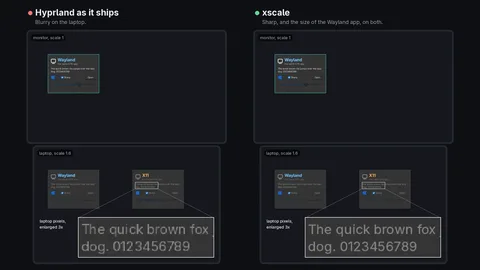
X11 has one coordinate space and one DPI for all its clients, so under Wayland an X11 app cannot be told that this monitor is 1.6 and that one is 1. Hyprland leaves two bad choices: X11 apps render at 1 and are enlarged, which is blurry, or they are shown pixel for pixel, which is small, and every toolkit is told a scale by hand, right on one monitor and wrong on the others.
xscale fixes it where it breaks. X11 apps render at the highest monitor's scale and each window is shown at its logical size, like a HiDPI Wayland window: pixel for pixel on that monitor, cleanly downscaled on the others, never enlarged.
Three parts
- The protocol.
xwayland_shell_v1gains one event,scale, in which the compositor tells Xwayland the scale its X11 clients render at. - Xwayland lays the X11 screen out at the outputs' logical geometry times that scale, shows every surface at its buffer size divided by it, and maps pointer, touch and tablet coordinates back. Without the event, nothing changes.
- Hyprland gets the option
xwayland:scale, the one scale every X11 client renders at.
No toolkit needs a patch. At every login xscale tells X11 toolkits the scale through the X resources and XSETTINGS, and Steam through its own variable.
Getting it onto a machine
Patching a compositor is only useful if people can keep up with it. xscale lays its patch over Arch's own recipe for the version Arch has, and nothing else of that recipe changes. A workflow builds both packages once a day and attests them, the installer checks what it downloads, pacman gives Arch's package back at Arch's next release, and xscale uninstall takes the rest away.
The Hyprland patch has also been offered to Omarchy.